8 Step Fix for Soft Bounce vs Hard Bounce: B2B Sender Checklist
, 11 min read
Hard bounces are permanent failures. The address does not exist, the domain is dead, or the recipient’s server has rejected you outright, so the correct move is to suppress that contact immediately. Soft bounces are temporary failures, meaning a full inbox or a slow server, and the right response is to retry on a sane schedule while you watch for a pattern. If soft bounces keep recurring on the same address, or if you see unfamiliar 5xx rejections, that is your signal to clean your list and check your authentication setup.
TL;DR:
- Hard bounces indicate permanent delivery failures, such as non-existent addresses or domain shutdowns, requiring immediate suppression from mailing lists.
- Soft bounces are temporary issues like full inboxes or server downtime, and retries are appropriate unless patterns persist or escalate to errors.
- Repeated soft bounces over time should lead to list cleaning, as they signal potential hygiene issues or server problems affecting deliverability.
- Elevated hard bounce rates can harm sender reputation and trigger throttling or blocking, so they must be swiftly identified and removed.
- Automating bounce handling with attention to SMTP reply codes and bounce patterns helps maintain list hygiene and protect domain reputation.
Table of Contents
- Soft Bounce vs Hard Bounce: The SMTP Definitions Marketers Need
- Common Causes Behind Each Bounce Type
- How ESPs Handle Bounces Behind the Scenes
- What Repeated Bounces Do to Your Sender Reputation
- A Step-by-Step Bounce Remediation Checklist
- A Sales Team’s Take on Bounce Prevention
- Why Marketers Overreact to Soft Bounces and Underreact to Hard Ones
- Templates and Guides to Put This Checklist to Work
- Sources
- FAQ
Soft Bounce vs Hard Bounce: The SMTP Definitions Marketers Need
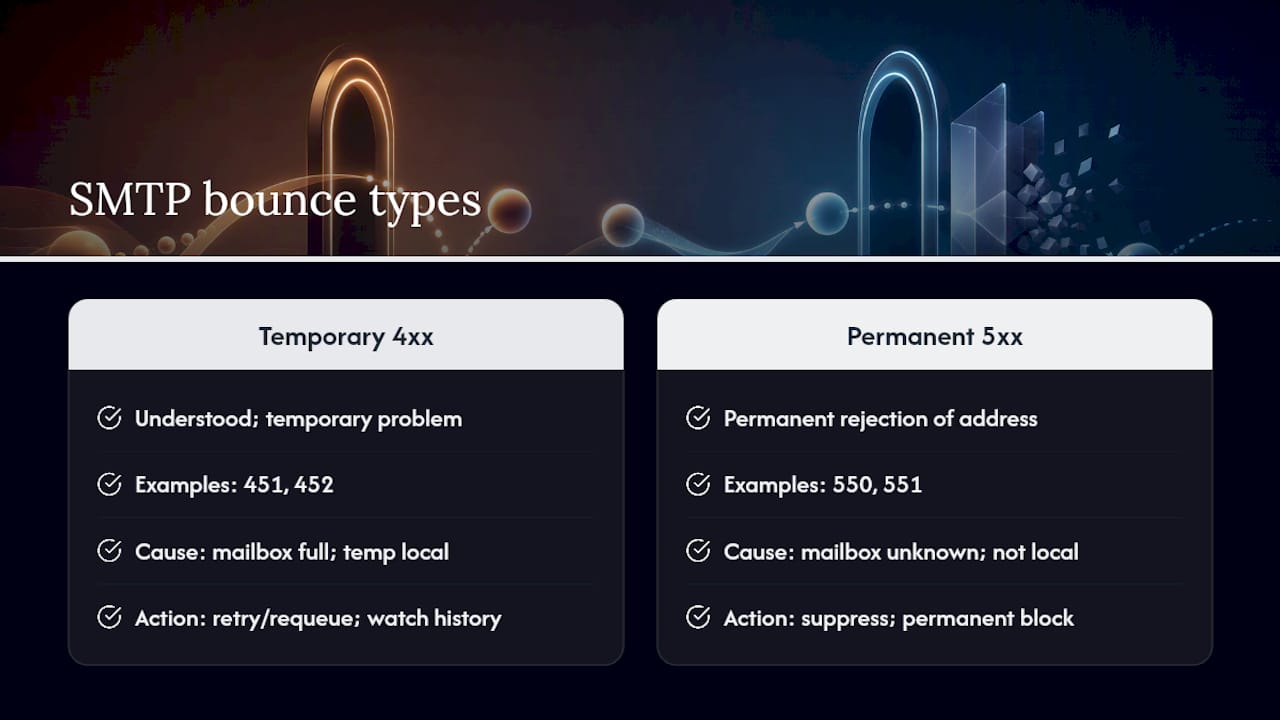
Every bounce your email platform reports traces back to an SMTP reply code, and that code is what separates a soft bounce from a hard bounce. Codes in the 4xx range signal a temporary problem: the receiving server understood your message but could not accept it right now. A “451 4.7.1 Temporary local problem” or “452 4.2.2 Mailbox full” both fall here. The server is asking you to try again later.
Codes in the 5xx range mean something different: permanent rejection. “550 5.1.1 User unknown” or “551 5.1.1 User not local” tell you the mailbox does not exist or will never accept your message, no matter how many times you send it. RFC 5321 actually encourages sending servers to requeue and try alternate mail exchange hosts before giving up on a message, and it recommends retry timeouts shorter than the full undeliverable window, which is exactly why soft bounces deserve a second attempt rather than an immediate suppression.
The classification is not always clean. Some receiving servers respond with a 5xx code after a pattern of repeated soft failures, effectively converting what looked temporary into a permanent block. That is why watching bounce history matters more than reacting to a single reply code in isolation.
Common Causes Behind Each Bounce Type
The cause behind a bounce usually tells you exactly which bucket it belongs in, and the SMTP response text is your best clue.
Soft bounce reasons typically include:
- A full recipient mailbox that will clear up on its own
- Temporary server downtime or maintenance on the receiving end
- Greylisting, where an unfamiliar sender is deliberately delayed on the first attempt
- A message that exceeds the recipient server’s size limit
- A spam filter holding the message for review rather than blocking it outright
Hard bounce reasons typically include:
- A mailbox that never existed or was deleted
- A domain that has expired or been shut down
- A permanent block placed by the recipient’s mail provider
- Authentication failures tied to SPF, DKIM, or DMARC policy enforcement
According to Shopify’s breakdown of bounce types, the difference almost always comes down to whether the failure is a snapshot of a bad moment or a permanent dead end. A reply reading “550 5.1.1 User unknown” means stop sending. One reading “421 4.3.2 Service not available” means try again shortly.
How ESPs Handle Bounces Behind the Scenes
Most email platforms automate the bulk of this decision for you, but understanding the mechanics keeps you from being surprised by a sudden drop in your sendable list. Hard bounces get suppressed automatically in nearly every major platform, since sending to a dead address again offers no upside and real reputation risk.
Soft bounces get more patience, but not infinite patience. Mailchimp’s own guidance confirms that repeated soft bounces on the same address eventually get converted to a hard bounce and cleaned from the list, a pattern that HubSpot and other list managers follow with their own thresholds. If your deferral rate climbs mid-campaign, Google’s guidance for Workspace senders recommends cutting your send volume until the error rate drops, then ramping back up slowly. Persistent failures after that point deserve a direct look, not another blind retry, and in some cases an allowlist request to the receiving ISP’s postmaster team.
What Repeated Bounces Do to Your Sender Reputation
A single soft bounce means nothing to your reputation. A pattern of soft bounces on the same domain over weeks tells receiving servers something is off with your list hygiene or your sending behavior, and that perception erodes trust even though each individual failure was technically temporary.
Hard bounces carry more immediate weight. Every hard bounce is a signal that you are sending to an address that should never have been on your list, and ISPs read a high hard bounce rate as evidence of poor list management or, worse, purchased data. That perception can trigger throttling, folder demotion, or in severe cases outright blocking at the domain or IP level.
Elevated hard bounce rates are generally treated as warning signs across most ESP guidelines, and it is worth pausing a campaign if you see spam complaints trending alongside rising bounces. That combination rarely resolves itself. It usually means your list needs cleaning before you send another message.
A Step-by-Step Bounce Remediation Checklist
When bounces spike, work through this sequence rather than reacting to each failure individually.
- Pull the SMTP reply codes for every bounced message and sort them by 4xx versus 5xx before doing anything else.
- Isolate the affected segment. Check whether failures cluster around one domain, one list source, or one send time.
- Suppress hard bounces immediately. Do not attempt a retry on any 5xx response, since ISP guidance is explicit that repeated sends to permanently rejected addresses damage your standing.
- Stagger retries for soft bounces rather than resending in a burst, and lower your overall send volume if deferrals are climbing across multiple recipients.
- Validate your list with an email verification tool before your next send, and consider double opt-in for new signups going forward.
- Audit SPF, DKIM, and DMARC records, since policy failures often show up as 5xx rejections that look like list problems but are actually authentication gaps.
- Remove chronic soft bouncers after a set number of consecutive failures, typically three to five attempts, and route unresponsive contacts into a separate reconfirmation sequence instead of your main list.
- Escalate to the postmaster when a single domain keeps rejecting you despite clean authentication and low complaint rates, and come prepared with your bounce logs and sending volume history as evidence.
Pro Tip: Keep a rolling log of which addresses soft bounce more than once. A contact that soft bounces on Monday and again the following week is a much stronger candidate for removal than one that bounces once during a known server outage.
A Sales Team’s Take on Bounce Prevention
Bounce management is not just a deliverability problem, it is a sequence design problem. Build a validation check into your cadence before the first send, not after the tenth bounce. When a contact soft bounces repeatedly, route them into a short reconfirmation message instead of continuing the sequence: something as simple as confirming you still have their correct address and asking if they would like to stay on your list. Place that message as a branch, not an afterthought, so it fires automatically rather than depending on someone noticing the pattern manually. Track your bounce rate, spam complaint rate, and open rate trend weekly, and treat any sustained dip in opens alongside rising bounces as a full list review trigger rather than a one-off anomaly.
Why Marketers Overreact to Soft Bounces and Underreact to Hard Ones
The instinct among most email marketers runs backward. Teams panic over a single soft bounce and manually remove contacts that would have delivered fine on retry, while letting hard-bounced addresses linger on a list because “the campaign still sent.” That is the wrong priority order.
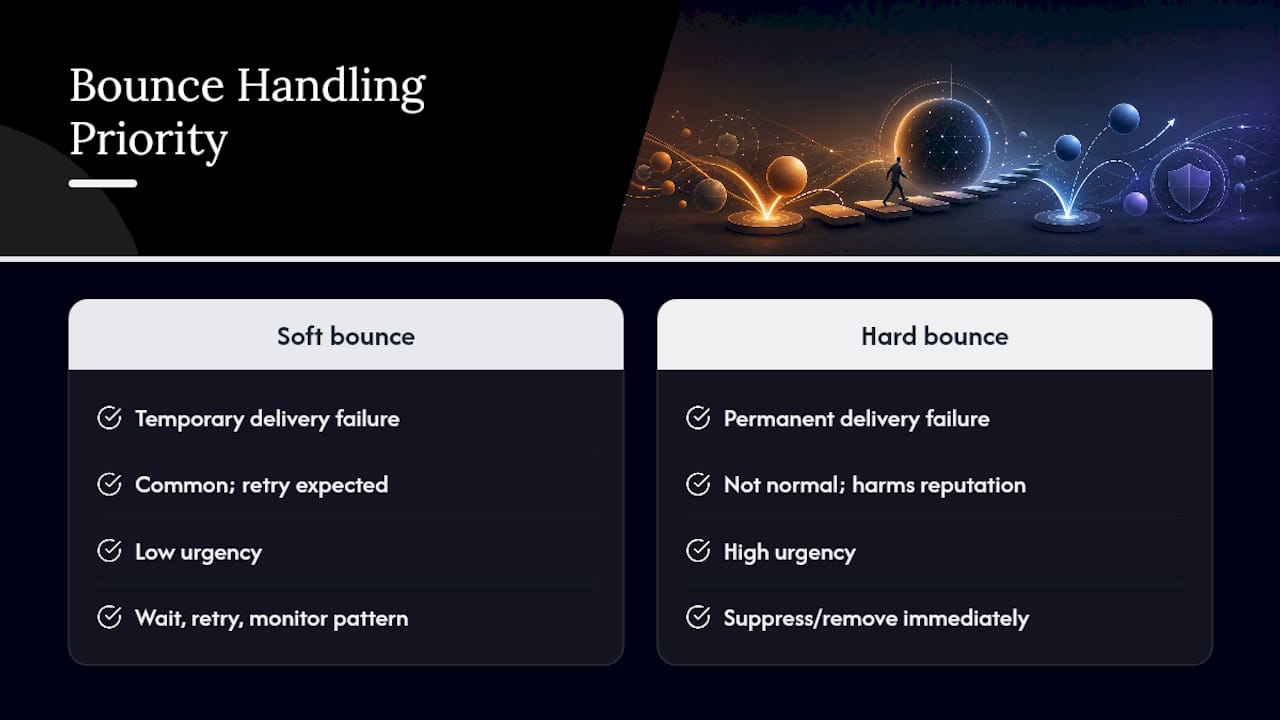
A soft bounce is normal email infrastructure behavior, not a crisis. Full mailboxes and slow servers happen constantly, and RFC-level retry logic exists precisely because the internet expects this friction. What actually deserves urgency is the hard bounce you have not suppressed yet, because every additional send to a dead address is a small, cumulative tax on your domain reputation.
The gap between what most bounce-handling guides recommend and what actually protects your sending reputation comes down to pattern recognition over single-event reaction. One soft bounce tells you nothing. Three soft bounces on the same address in a month tell you to stop retrying and start investigating. Build your remediation workflow around that distinction, not around treating every bounce notification as equally urgent.
— Samuel
Templates and Guides to Put This Checklist to Work
Running the remediation checklist above gets easier with the right material on hand rather than building each piece from scratch under deadline pressure. If your reconfirmation sequence needs a starting point, the 12 cold email templates collection includes structures you can adapt for a “still want to hear from us” message, which fits directly into step seven of the checklist above.
For the monitoring side of this problem, Cold Email Deliverability: What Predicts Spam goes deeper into the reputation signals ISPs track beyond bounce rate alone, including how spam complaints and engagement trends interact with the deferral patterns covered here. Usesalespitch does not sell list-cleaning software or bounce-suppression tools directly. What it offers instead is the practical, written groundwork: the templates, the sequence logic, and the deliverability breakdowns that turn a bounce report into a fixed sending problem. Start with the deliverability guide if your bounce rate is climbing this week, and pull the template pack when you are ready to build the reconfirmation branch into your next cadence.
Sources
- RFC 5321
- Fix bounced or rejected emails - Google Workspace Admin Help
- Soft vs. Hard Bounces | Mailchimp
- Hard bounce vs soft bounce — Shopify blog
FAQ
Should I delete hard bounce emails?
Yes. Once an address returns a permanent 5xx failure, remove or suppress it right away rather than attempting another send. ISP guidance is direct on this point: repeated sends to a permanently rejected address damage your sender reputation with no chance of the message ever arriving.
Is a 20% bounce rate good?
No, a 20% bounce rate signals a serious list health problem. Healthy sending programs typically keep bounce rates well under 2%, and any spike near that range should trigger an immediate pause and a full list audit rather than a continued send.
Why am I getting bounced emails that I didn’t send?
This usually points to a spoofed sender address, where someone forged your domain in the “from” field of spam they sent, and the bounces are landing back with you instead of them. Tightening your SPF, DKIM, and DMARC records reduces how easily your domain can be spoofed this way.
What does a hard bounce mean in Mailchimp?
In Mailchimp, a hard bounce means the platform received a permanent rejection, such as a nonexistent address, and it automatically moves that contact to a cleaned status so future campaigns skip it. Mailchimp’s own documentation confirms this suppression happens without manual intervention to protect your sending reputation.
What’s the real difference between bounces at a glance?
A hard bounce is permanent and unfixable by retrying, while a soft bounce is temporary and often resolves on its own within a day or two. The dividing line is the SMTP reply code: 5xx means stop, 4xx means try again later.