B2B Sales: Out of Office Replies, Auto Pause, Templates, 15 Minute Triage
, 12 min read
When a prospect sends an out of office reply, pause the cadence, extract the return date and any named delegate, and schedule a timed, human-checked follow-up. Do not forward the original email or resume blindly on the return date. That single sequence, done consistently, turns a message most reps ignore into one of the highest-yield signals in your pipeline.
TL;DR:
- Detect out of office replies with header checks, phrase matching, and a lightweight classifier, then pause outreach immediately upon detection.
- Extract key fields such as return date, delegate contact, and job-change signals to enable automated follow-up and workflow triggers.
- Wait one to two business days after the return date before resuming outreach, ensuring the prospect has had time to clear their inbox.
- Use tailored templates for delegate outreach, reengagement after return, and job-change scenarios, personalized with real extracted details.
- Tag out of office replies separately from genuine responses to keep reply-rate metrics accurate and track OOO-specific conversion metrics.
Table of Contents
- Detecting Out of Office Replies and Automating the Response
- Which Fields to Extract From Every Out of Office Message
- When to Resume Outreach After an Out of Office Reply
- Templates for Delegates, Reengagement, and Job Changes
- Keeping OOO Data Out of Your Reply-Rate Metrics
- Why This Matters More Than Most Teams Realize
- What the Conventional Advice Gets Wrong
- Where to Find Ready-Made Templates and Sequence Guidance
- Sources
- FAQ
Detecting Out of Office Replies and Automating the Response
Most teams treat out of office replies as noise. That is a mistake, given that a substantial portion of replies to cold emails are auto-replies, nearly three times the rate of genuine positive responses. Ignoring that volume means ignoring your single richest source of first-party data.
Detection should run on three layers working together, not one:
- Header checks — scan for
X-Autoreply,Auto-Submitted, and delivery headers that most mail servers already stamp on automatic responses. - Phrase matching — flag common patterns (“out of office,” “away from my desk,” “back on,” “no longer with the company”).
- A lightweight classifier — catch the messages that dodge both header and phrase rules, including informal or oddly worded auto-replies.
Once a message is tagged, the cadence should pause immediately. Do not wait for a second reply or a rep to notice. Route every flagged message into a shared reply hub where it gets classified and enriched into your CRM automatically, rather than sitting in an individual inbox where the data dies. A two-layer operating model works best here: automation owns the repetitive bookkeeping (pausing, tagging, field extraction), while a human owns judgment calls, like an ambiguous delegate mention or a reply that mixes an OOO with a real objection.
Pro Tip: Set your classifier to flag confidence below 85% for manual review instead of forcing a binary decision. Ambiguous replies that get auto-paused incorrectly cost you far less than ones that get missed entirely.
Which Fields to Extract From Every Out of Office Message
An out of office reply is only valuable if you pull structured data out of it before it disappears into a thread. Structured extraction of return dates, delegate contacts, and job-change language is what makes downstream automation possible. Without field-level data, you’re back to a rep manually rereading an inbox.
Prioritize these fields:
- Return date — write to a CRM field like
ooo_return_dateso resume timing can be scheduled without a human checking a calendar. - Delegate name and email — create a new contact record tagged with a relation such as “backup contact for [original name].”
- Job-change indicators — phrases like “no longer with,” “has moved on,” or “please contact” signal a departure, not a delay.
- Travel, conference, or alternate-channel mentions — useful for personalization in the eventual follow-up.
- Emergency or personal numbers — flag these “do not cold-call” immediately; they were shared for urgent business use, not prospecting.
| Field Extracted | Destination | Action Triggered |
|---|---|---|
| Return date | ooo_return_date (CRM) |
Schedules resume + buffer |
| Delegate name/email | New contact, tagged “backup contact” | Triggers delegate outreach template |
| Job-change flag | Archive old contact | Starts 90-day job-change sequence |
| Travel/conference mention | Tag for personalization | Adjusts next message tone, not timing |
| Emergency contact number | Tag “do not cold-call” | Suppresses from calling lists |
Job-change signals deserve their own workflow. Archive the old contact record so it stops cluttering active pipelines, then start a fresh sequence aimed at the new company within a 90-day window, while the move is still fresh and the person is receptive to new vendor conversations.
When to Resume Outreach After an Out of Office Reply
Timing is where most automated sequences quietly damage themselves. Resuming the moment a prospect’s return date hits often means your email lands in an inbox still buried under 400 unread messages, which is a fast way to get deleted unread. Waiting one to two business days after the stated return date consistently performs better than an immediate resume.
Follow this restart checklist before any cadence goes live again:
- Confirm the return date parsed correctly. If no date was extractable, default to a 10-day pause rather than guessing.
- Check for intervening replies. A prospect may have responded again, changed roles, or objected while the cadence sat paused.
- Refresh the copy. Don’t resume with stale messaging written weeks earlier; confirm the offer and timing still make sense.
- Reconfirm relevance. If the pause ran longer than 14 days, acknowledge the gap briefly in the next message rather than pretending no time passed.
- Compress the remaining cadence. If only two or three touches were left before the pause, don’t stretch them back out. Tighten the spacing.
If the pause followed a bounce or domain issue rather than a simple OOO, ramp resumed volume up gradually instead of firing the full queue at once. Seasonal patterns matter too: OOO volume spikes in late February, early April, Memorial Day, Thanksgiving week, and year-end, while mid-January and deep summer run lower. Plan your resume windows with that curve in mind rather than a fixed calendar rule.
Templates for Delegates, Reengagement, and Job Changes
Once detection, extraction, and timing are handled, the actual copy is short work. Three templates cover almost every scenario an out of office reply generates.
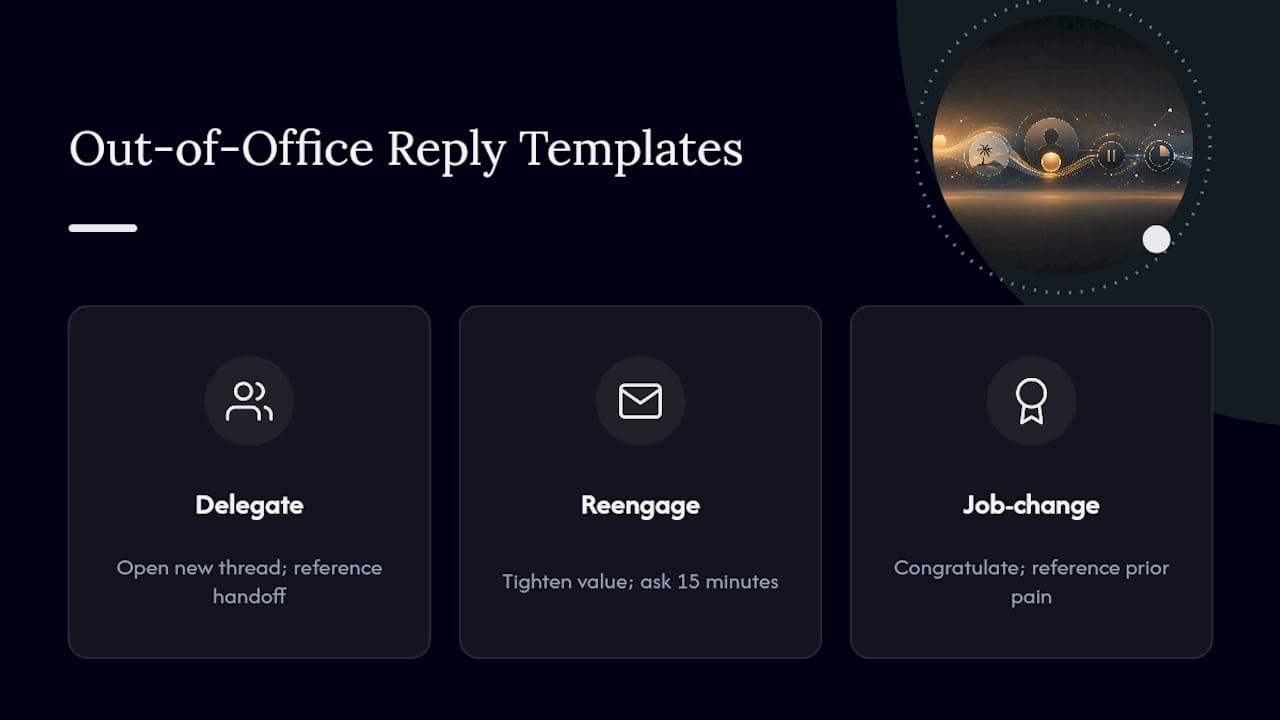
Delegate outreach — never forward the original email to a named backup contact. Open a new thread that references the handoff directly:
“Hi [Delegate Name], [Original Contact] mentioned you’re the right person to loop in while they’re out. I was reaching out about [specific problem/value prop] — is that something on your plate, or is there a better person on your team to point me to?”
Post-return reengagement — skip any mention of the vacation entirely. Tighten the value proposition instead of restating the original pitch:
“Hi [Name], following up on my note from a couple weeks back. Since then, [one sharp, specific detail — a stat, a new feature, a relevant trigger event]. Worth 15 minutes this week?”
Job-change follow-up — congratulate first, then reference the prior relationship before pitching anything:
“Congrats on the move to [New Company] — saw the update. When we spoke at [Old Company], you mentioned [specific pain point]. Curious whether that’s still a priority in the new role, or if things look different now.”
A few usage notes make these convert better. Personalize with real detail from the extracted fields, not generic placeholders. When referencing a delegate’s name in outreach, get explicit permission where possible, or phrase it as “[Name] suggested I reach out” only when the original message actually named that person as a point of contact. The 12 cold email templates collection has additional variants worth adapting for industry-specific phrasing.
Pro Tip: Never send the delegate template and the reengagement template to the same prospect in the same week. If a delegate was named, that thread takes priority; don’t run parallel conversations that confuse the account.
Keeping OOO Data Out of Your Reply-Rate Metrics
Counting auto-replies as engagement quietly wrecks your reporting. If OOOs make up close to half of all replies in a typical cold outreach dataset, leaving them untagged inflates your apparent reply rate while hiding your true conversion signal.
Fix this with clean separation, not extra dashboards:
- Tag OOO replies and referral replies as distinct categories, separate from genuine human engagement.
- Track a dedicated “OOO yield” metric: meetings booked or new leads sourced specifically from mined delegate and job-change data.
- Strip auto-replies from any A/B test comparison before judging subject line or copy performance. A test skewed by seasonal OOO spikes will produce false conclusions about what worked.
A simple reporting table works better than a complex dashboard here: track counts for human replies, auto-replies, referrals surfaced, and conversions closed from each bucket. That structure keeps your funnel honest and makes OOO mining visible as its own contributing channel instead of noise buried inside “total replies.”
Why This Matters More Than Most Teams Realize
Out of office replies are not wasted sends. They’re often the cheapest first-party data you’ll get all quarter, arriving with a return date, a name, and sometimes a job change, without spending a cent on a new list. Industry experience shows that reps who mine OOOs deliberately consistently outperform those who treat them as dead ends.
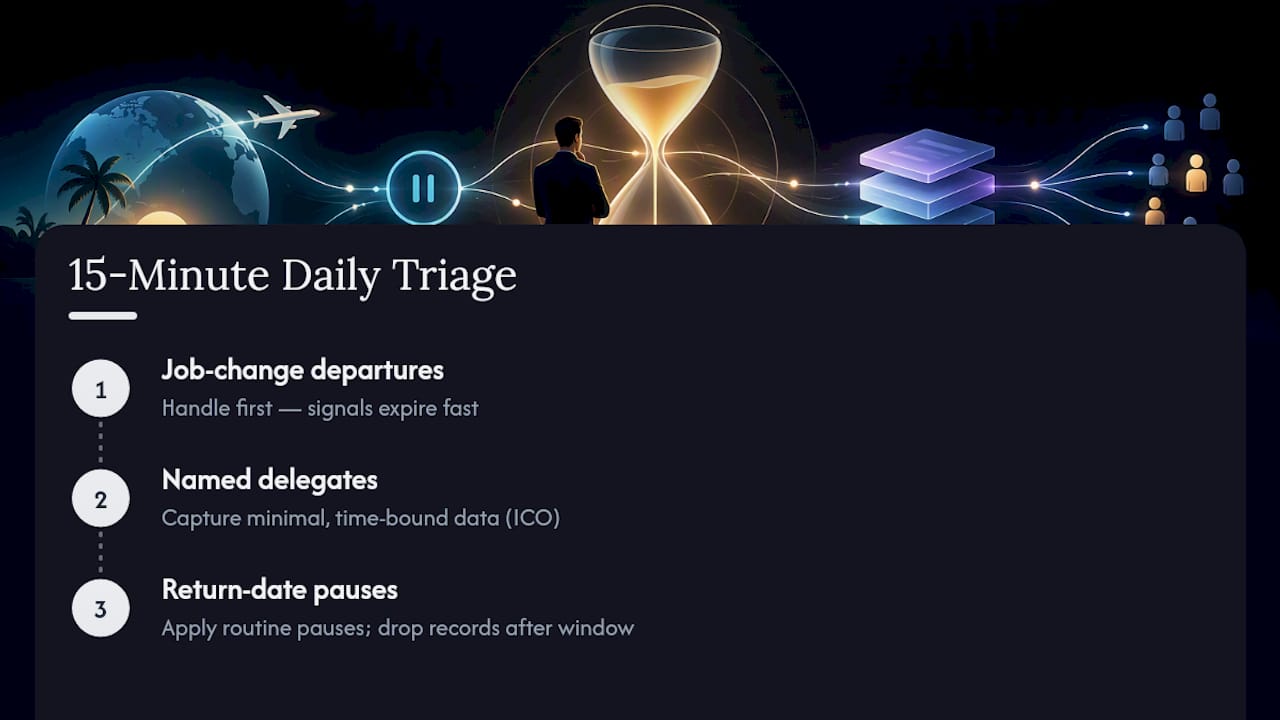
The fix doesn’t require more tooling. It requires one 15-minute daily habit: triage departures first, as job-change signals expire fast, then delegates, then routine return-date pauses. Keep delegate data minimal and time-bound, per ICO direct marketing guidance, and don’t retain contact records past their useful window.
What the Conventional Advice Gets Wrong
Most guidance on out of office replies stops at “set a filter and move on.” That advice treats OOOs as an inbox hygiene problem instead of what they actually are: structured, voluntary intelligence a prospect handed you for free.
The bigger error is timing discipline, or the lack of it. Teams that auto-resume the instant a return date passes are optimizing for automation speed over human attention span, and it shows in their reply rates. A one to two day buffer costs nothing and consistently performs better than instant resumption.
What deserves priority isn’t better copy. It’s the extraction layer: return date, delegate contact, job-change flag. Get those three fields flowing into your CRM reliably, and the templates become almost interchangeable. Skip that step, and even a well-written delegate outreach message lands on a contact record that doesn’t exist yet, which means it never gets sent at scale.
— Samuel
Where to Find Ready-Made Templates and Sequence Guidance
Building the detection rules and CRM fields covered here takes engineering time most sales teams don’t have sitting around, which is why ready-to-use copy can be valuable instead of a build project. Rather than drafting delegate outreach and job-change follow-ups from scratch, pull from the 12 cold email templates collection and adapt the phrasing to your own accounts.
If you’re deciding where the pause and resume logic should live, the comparison of native CRM sequences versus a separate sales engagement tool walks through the tradeoffs before you commit engineering time to either path. For teams still weighing platforms entirely, the breakdown of Klenty versus Outreach covers how each handles automated reply classification. Browse the full Sales Pitch library for ongoing tactical guides as outreach benchmarks shift through 2026.
Sources
- The best cold email reply is an out-of-office | Quantonica Blog
- Out-of-office reply rates
- Direct marketing guidance: Respect people’s preferences (ICO)
- Out-of-Office and referral replies: The two cold email responses most reps waste — Growtoro Blog
FAQ
What Counts as an Out of Office Reply in a Sales Sequence?
It’s any automated response triggered by a prospect’s absence, including vacation notices, travel alerts, and departure announcements. These differ from genuine replies and should be tagged separately, since they can make up close to 45% of all replies in a typical cold outreach dataset.
How Long Should I Pause a Cadence After an OOO Reply?
Pause immediately, then resume at the stated return date plus one to two business days to avoid landing in a still-crowded inbox. If no return date can be extracted, default to a 10-day pause before resuming.
Should I Contact a Delegate Named in an Out of Office Message?
Yes, but open a new, contextual thread rather than forwarding the original email. Reference the handoff directly and ask a routing question, since referral and delegate replies convert better than cold first-touch sends when handled deliberately.
Do Out of Office Replies Count Toward My Reply Rate?
No. Tag them as a distinct category and exclude them from standard reply-rate and A/B test calculations, or you’ll skew your metrics with auto-generated noise. Track a separate “OOO yield” metric instead to measure meetings or leads recovered through deliberate mining.
How Long Should I Keep Delegate Contact Data?
Keep only minimal fields, name, email, and relation to the original contact, and retain them no longer than necessary, often around 90 days if the delegate never engages. This aligns with direct marketing guidance on respecting preferences and minimizing retained data.