Sales Tested Meeting Request Emails That Win: Templates and Timing
, 15 min read
Ask plainly, state what’s in it for the recipient, propose two or three specific times with duration and time zone, list the logistics, and close with one clear call to action. That structure works because it removes friction: the recipient can say yes without asking a single follow-up question. A well-built meeting request email also builds credibility before the meeting even happens, which matters as much in a cold sales outreach as it does in an internal one-on-one request.
TL;DR:
- Offering two to three specific time slots with clear durations and time zones significantly reduces scheduling delays in meeting requests.
- Including all essential logistics, such as platform links and dial-in details, in the email ensures recipients can attend without follow-up questions.
- Personalization should be brief and relevant, referencing mutual contacts or recent actions, without delaying the core purpose of the email.
- Clearly stating the meeting purpose and emphasizing the recipient’s benefits increases the likelihood of a positive response.
- Following up with two reminders spaced a few days apart, adding new value each time, improves the chances of securing the meeting.
Table of Contents
- What Should a Meeting Request Email Include?
- Subject-Line Formulas and Tested Examples
- How Much Personalization Belongs in the Opener?
- How Do You State Purpose and WIIFM Together?
- How Many Time Slots Should You Propose?
- What Logistics Belong in the Email?
- How Do You Close a Meeting Request Email?
- Copy-Ready Meeting Request Email Templates
- How Long Should You Wait Before Following Up?
- Common Mistakes and a Final Send Checklist
- Author Perspective: Practical Notes From Sales Pitch
- Sources
- FAQ
What Should a Meeting Request Email Include?
Every effective meeting request email contains the same building blocks, regardless of whether you’re pitching a prospect or asking a colleague for 20 minutes. Skip one of these and you invite a slower reply, or no reply at all.
Here’s the checklist to run before you hit send:
- Subject line that states the topic and, when useful, the time ask (“Quick 15 min to review Q3 pipeline?”).
- Greeting using the recipient’s name, correctly spelled.
- One-line introduction only if the recipient doesn’t already know you.
- A single, clear purpose statement stating why you want the meeting.
- A WIIFM line telling the recipient what they get out of showing up.
- Two to three proposed times, each with duration and time zone.
- Logistics: virtual link, dial-in, or physical location.
- A specific CTA: reply, accept the invite, or click a scheduling link.
- A signature with your name, title, company, and a way to reach you.
Before any of that leaves your outbox, verify the recipient’s email address. A bounced message to a decision-maker doesn’t just fail to book the meeting. It can flag your domain to spam filters and hurt deliverability on every message you send afterward, which is why verifying addresses first is worth the extra 30 seconds.
Subject-Line Formulas and Tested Examples
Your subject line decides whether the email gets opened at all, so it carries more weight than any single sentence in the body. Keep it under roughly 60 characters, name the topic or the recipient, and mention the time commitment when that detail helps the reader decide quickly.
Formulas that consistently perform:
- Cold outreach: “15 min on [specific pain point] for [Company]?”
- Warm outreach: “Following up, [Name] — got 20 min this week?”
- Referral intro: “[Mutual Contact] suggested we connect”
- Internal one-on-one: “1:1 this week — [topic]”
- Client demo: “Ready to see [Product] in action? 20 min this week”
Curiosity has a place, but clarity wins more often. A subject line that hides the topic to spark intrigue tends to get skipped by busy inboxes rather than opened out of suspense.
Pro Tip: Run two subject-line variants against the same list segment for a week and track open rates before locking in your default. Small wording shifts, like swapping “meeting” for a time estimate, often move the needle more than people expect.
Subject lines that clearly signal both the purpose and the time commitment consistently outperform vague alternatives on open and reply rates. Vague subject lines like “Quick question” or “Touching base” no longer earn the benefit of the doubt in a crowded inbox.
How Much Personalization Belongs in the Opener?
Enough to prove you did your homework, not so much that it delays the ask. One line referencing a mutual contact, a recent post, or a specific detail about the recipient’s role signals relevance faster than three sentences of biography ever could.
Use this structure for your opening lines:
- Personalization hook: name a mutual contact, recent announcement, or specific project.
- Brief self-introduction: your role and company, only if the recipient doesn’t already know you.
- Deferred credibility: save your longer bio or portfolio link for the signature, not the opening paragraph.
Personalization paired with a one-line value statement raises reply likelihood, but only when it stays specific and brief. A generic compliment (“I love what you’re doing at [Company]”) reads as filler and often backfires, since it signals a template rather than genuine research.
How Do You State Purpose and WIIFM Together?
State your purpose and the recipient’s payoff in one or two sentences, and phrase the payoff in terms of what they gain, not what you need. “I’d like to show you how [Product] cuts onboarding time” beats “We want to discuss our platform” because it puts the recipient’s outcome first.
Be explicit about what kind of meeting this is. A discovery call, a demo, a decision meeting, and an information-gathering session all set different expectations, and naming the type upfront prevents a mismatch once the call starts. Recipient-centered phrasing means minimizing “we” and maximizing “you”: swap “we’d love to walk you through our roadmap” for “you’ll see exactly how this fits your current stack.”
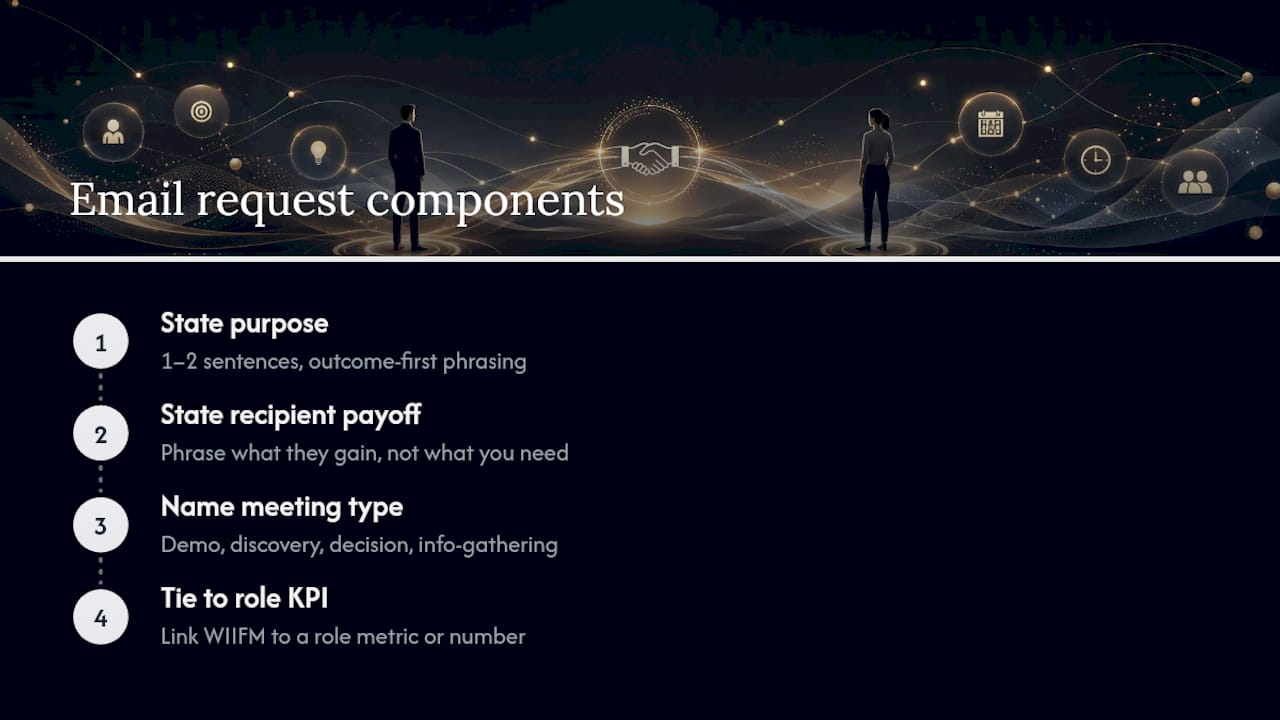
Pro Tip: When you know the recipient’s role or a public KPI they’re accountable for, tie the WIIFM directly to it. A sentence like “you’ll see how this could shave two days off your current approval cycle” lands harder than a generic feature pitch, because it speaks to a number they’re already tracking. This kind of outcome framing works especially well in B2B outreach where recipients evaluate meetings against their own metrics.
How Many Time Slots Should You Propose?
Two or three, each with a specific duration and time zone. Offering concrete options rather than an open-ended “let me know when works” speeds up scheduling and cuts down the back-and-forth that eats a week before a meeting even gets on the calendar.
A dependable pattern:
- List slots as “Tuesday, March 17 at 10:00 AM EST (30 min)” rather than vague windows like “sometime Tuesday morning.”
- Add a fallback line: “Or let me know a time that works better on your end.”
- Skip a scheduling link in cold outreach, where it can feel presumptuous before the recipient has agreed to meet at all.
- Save scheduling links for warm contacts or repeat clients who already expect to book with you directly.
If you’re writing to someone senior, flip the approach. Offer fewer slots, or none at all, and ask for their availability instead. Executives and department heads tend to guard their calendars closely, and asking them to fit into your grid rather than offering to fit into theirs can read as tone-deaf.
What Logistics Belong in the Email?
Include everything the recipient needs to show up without asking a follow-up question: the platform name, the join link, any dial-in number, and a passcode if the platform requires one. Attach an agenda only when it’s actually ready. A half-finished agenda invites more questions than it answers.
A few rules keep this section clean:
- Send the full calendar invite only after the recipient confirms a time, not before.
- Use plain, unshortened links so spam filters and cautious recipients don’t flag them.
- Note the meeting length in the invite itself, not just in the email body.
- Add a five- or ten-minute buffer for calls that involve screen sharing or multiple attendees, since setup delays are common.
Choosing the right scheduling tool also shapes how smooth this step feels for both sides; a quick look at scheduling link options like Calendly, Chili Piper, and SavvyCal is worth it if you send meeting requests daily.
How Do You Close a Meeting Request Email?
Give the recipient one action, not three. A closing line that offers “reply, or accept the invite, or click my link, or call me” forces a decision about how to respond before they’ve even decided whether to attend.
Pick one CTA and state it plainly:
- “Reply with a time that works and I’ll send the invite.”
- “Accept the calendar invite above and I’ll take it from there.”
- “Grab a slot directly on my [scheduling link].”
Your signature should carry your full name, title, company, phone number, and, when relevant, a one-line link to your calendar. Keep the sign-off short: “Best,” “Thanks,” or “Looking forward to it” all do the job without adding weight to an email that should already feel light. For CTA phrasing that closes cleanly, a short list of English phrases that close a sale doubles as a reference for tightening your final line.
Copy-Ready Meeting Request Email Templates
Each template below follows the same skeleton: subject line, three to five lines of body, one CTA, and a sign-off. Personalize the bracketed sections and cut anything that doesn’t apply to your situation.
-
Cold outreach. Subject: “15 min on [pain point] for [Company]?” Body: “Hi [Name], I work with [Company Name] on [specific area], and noticed [specific detail about their business]. Companies like yours often struggle with [pain point], and I’d like to show you how we’ve helped similar teams fix it. Would Tuesday at 10:00 AM EST or Wednesday at 2:00 PM EST work for a 15 minute call? Reply and I’ll send the invite.”
-
Warm outreach. Subject: “Following up, [Name] — 20 min this week?” Body: “Hi [Name], great chatting at [event/context]. I’d like to continue the conversation about [topic] and show you a bit more detail. Does Thursday at 11:00 AM EST work, or would another time this week suit you better? Let me know and I’ll lock it in.”
-
Referral intro. Subject: “[Mutual Contact] suggested we connect.” Body: “Hi [Name], [Mutual Contact] mentioned you’re working on [project] and thought we should talk. I’d like to share how we approached something similar for [relevant example]. Are you free Monday at 1:00 PM EST for 20 minutes?”
-
Internal one-on-one. Subject: “1:1 this week — [topic].” Body: “Hi [Name], can we grab 20 minutes this week to align on [topic]? I’d like your input before I move forward. Tuesday at 9:00 AM or Wednesday at 3:00 PM both work for me. Let me know which is easier.”
-
Client demo request. Subject: “Ready to see [Product] handle [use case]?” Body: “Hi [Name], based on our last conversation, I’d like to show you exactly how [Product] handles [use case]. It’s a 25 minute walkthrough, and you’ll leave with a clear picture of setup time. Does Thursday at 10:00 AM EST work?”
-
Reschedule. Subject: “Need to shift our [day] meeting.” Body: “Hi [Name], something’s come up and I need to move our [day] meeting. Could we do [new time] instead, or would later in the week work better for you? Sorry for the shuffle.”
-
Follow-up nudge. Subject: “Still good for [day]?” Body: “Hi [Name], just checking whether [proposed time] still works on your end. Happy to shift if something changed. Let me know either way.”
How Long Should You Wait Before Following Up?
Send your first nudge three to four business days after the initial request if you hear nothing back, then a second one five to seven days after that. If there’s still silence around the two-week mark, a short break-up email is more effective than a fourth ask, since it often prompts a reply out of politeness alone.
For meetings that are already confirmed, timing shifts from persistence to preparation:
- Send a reminder one to two days before any standard meeting.
- Send a same-day reminder for high-priority calls, especially with senior stakeholders or first-time prospects.
- Keep every reminder short. Messages under roughly 125 words read faster and get better response rates than longer ones.
- On the second or third nudge, add something new. A relevant article, a case study, or a fresh data point gives the recipient a reason to respond beyond simple guilt.
Once the meeting actually happens, momentum matters more than politeness. Sending a recap within 24 hours locks in decisions while they’re still fresh, and a recap that names an owner and a due date for each next step converts into action far more reliably than a vague “great chatting today” note.
Common Mistakes and a Final Send Checklist
The same handful of errors show up across cold outreach and internal requests alike, and they’re easy to fix once you know to look for them.
- Stating a vague purpose (“touching base,” “quick chat”) instead of a specific reason.
- Skipping proposed times entirely and leaving scheduling to a second round of emails.
- Forgetting the time zone, which forces the recipient to guess or ask.
- Writing long paragraphs when three sentences would do the job.
- Following up too aggressively, with less than two business days between nudges.
| Quick win | Why it matters |
|---|---|
| Name the topic in the subject line | Drives opens before anything else in the email gets read |
| Propose 2–3 times with time zone | Cuts scheduling back-and-forth |
| One CTA, not three | Removes decision friction for the recipient |
| Recap sent within 24 hours | Locks in decisions while details are fresh |
Run your draft against this list before sending: subject, personalization, purpose, times, logistics, CTA, signature. Seven checks, thirty seconds, and a noticeably better reply rate.
Author Perspective: Practical Notes From Sales Pitch
The biggest gap I see in meeting request emails isn’t tone or politeness. It’s specificity. Reps write “would love to connect” when they mean “I want 15 minutes to show you a specific fix for a specific problem,” and the vague version always underperforms the direct one. Recipients don’t reward hedging. They reward clarity, because clarity respects their time.
The follow-up cadence matters more than most people admit to themselves. Reps stop after one unanswered email because it feels like the polite thing to do, but silence usually means “busy,” not “no.” A second and third nudge, spaced a few days apart and each carrying something slightly new, consistently outperforms a single well-crafted ask. Persistence framed as helpfulness, not pressure, is the difference.
— Samuel
Sources
The templates and timing guidance above draw on a handful of authoritative sources. Mailchimp’s meeting request guide outlines the core structural elements. Indeed’s scheduling guide covers time-slot best practices. HubSpot’s follow-up templates inform the nudge cadence. Kuno’s meeting follow-up guide and Krisp’s step-by-step breakdown round out the recap and verification advice.
For more ready-to-use scripts, the 12 cold email templates on Usesalespitch cover a wider range of outreach scenarios than meeting requests alone. If you’re deciding whether a scheduling link belongs in your signature at all, Forge’s guidance on tightening client conversations is worth a look before your next batch of outreach.
- Crafting a Meeting Request Email | Mailchimp
- How to Schedule a Meeting by Email (With Templates) | Indeed
- 19 templates for follow-up emails after a meeting, conference, and more | HubSpot
- Meeting follow-up: How to turn a meeting into action (2026 guide) | Kuno
FAQ
How Do You Politely Ask for a Meeting?
State the purpose in one sentence, add a line on what the recipient gets from attending, and propose two or three specific times with duration and time zone. Politeness comes from respecting the recipient’s time with a clear, low-effort ask, not from extra pleasantries.
How Do You Write an Email to Get a Meeting Scheduled?
Open with a short personalized line, state your purpose and the recipient’s benefit, then offer concrete time slots rather than an open-ended question. Close with a single CTA, like replying to confirm or accepting a calendar invite, so the recipient can act in one step.
How Do You Politely Send an Email Request?
Lead with the ask stated plainly, avoid burying it under long context, and give the recipient an easy way to say yes. A request that names the exact outcome you want, whether that’s a reply, a signature, or a scheduled call, reads as more polite than one wrapped in vague language.
How Do You Send a Meeting Request in Outlook?
Open a new email, add your recipient, write your subject line and body following the standard checklist, then use Outlook’s “New Meeting” or calendar invite option once the recipient confirms a time. Sending the calendar invite only after confirmation avoids cluttering the recipient’s calendar with tentative holds.
How Soon Should You Follow Up After a Meeting Request Email?
Send a first follow-up three to four business days after the original request if you haven’t heard back, then a second one five to seven days after that. If there’s still no response by around two weeks, a short break-up email tends to prompt a reply better than another straightforward nudge.