7 Day Fix for Disposable Email Addresses in B2B Outreach
, 9 min read
7 Day Fix for Disposable Email Addresses in B2B Outreach
Disposable email addresses are a near-certain exclude for any B2B cold outreach list. They bounce, they never engage, and a single batch of them can damage sender reputation on a domain you have not even finished warming up. The correct move is simple: verify every address before the first send, strip out anything disposable, and route catch-all or role-based flags through a separate check rather than deleting them outright.
TL;DR:
- Verifying lists before campaigns and blocking disposable, unreachable, or suspect addresses can prevent high bounce rates and protect sender reputation.
- Combining multiple detection methods, including blacklists, SMTP checks, and behavior analysis, increases accuracy in identifying disposable or invalid addresses.
- Separating risk tiers and sending only verified, clean addresses during warm-up helps build domain reputation and avoids damaging high-bounce campaigns.
- Dropping disposable addresses permanently and verifying role-based addresses instead of rejecting them improves response rates and finds actual contacts.
- Automating real-time verification at sign-up and re-verifying lists every 90 days maintains list hygiene and ensures ongoing deliverability.
Table of Contents
- Why Disposable Email Addresses Matter for B2B Cold Outreach
- How Verification and Detection Actually Find Disposable Addresses
- Pre-Send Verification Workflow and Warm-Up Protection
- How to Act on Flagged Addresses: Drop, Tier, or Test
- Your 7-Day Deliverability Checklist
- Sales Pitch’s Take: List Hygiene Isn’t Busywork, It’s Leverage
- Clean Your List, Then Send With Confidence
- Sources
- FAQ
Why Disposable Email Addresses Matter for B2B Cold Outreach
A disposable email address is a temporary inbox a prospect creates (often through services designed for exactly this purpose) to dodge a gated form, avoid a newsletter, or hand over something other than their real work address. For a sales team, the address itself is not the threat. The threat is what happens after you send to it.
Most major inbox providers throttle or block senders whose hard bounce rate crosses roughly 2%. Unverified cold lists routinely blow past that ceiling: bounce rates on unverified lists run between 12% and 25%, far beyond what any provider tolerates before flagging the sending domain. Disposable addresses are one of the biggest contributors to that gap, since most of them expire in hours and were never going to accept mail in the first place.
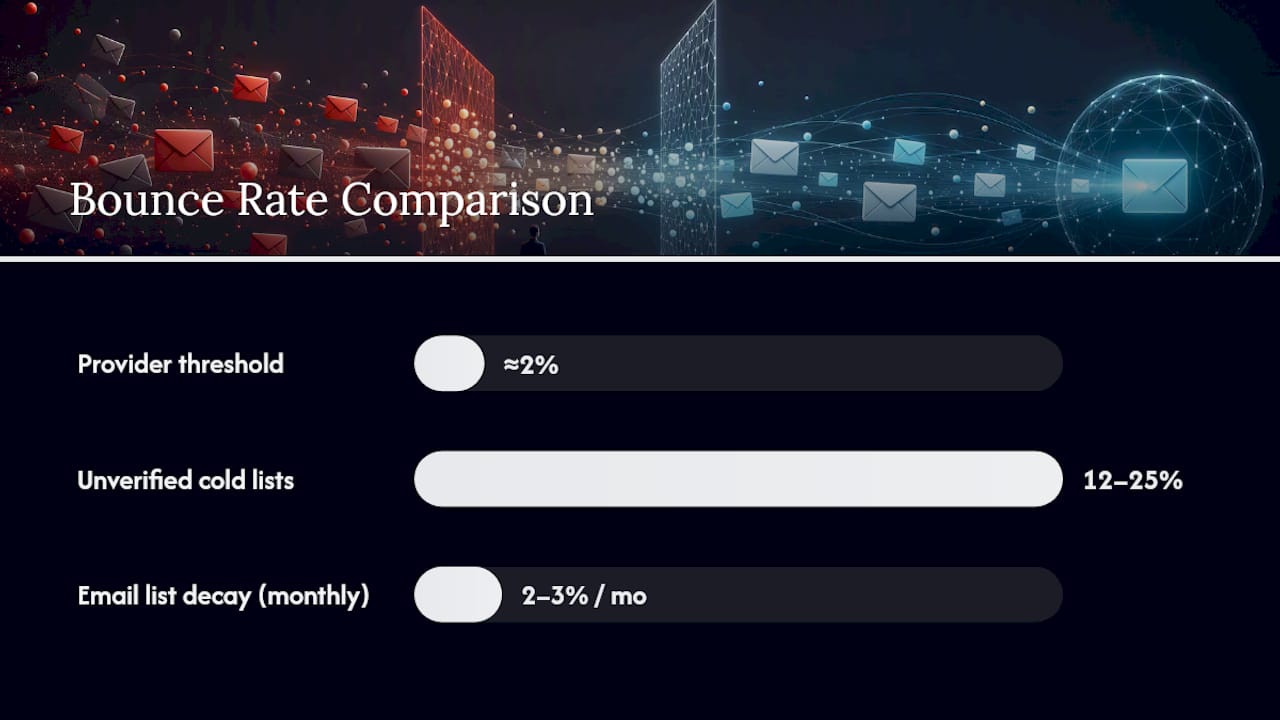
Stat check: Email lists decay at roughly 2% to 3% per month as people change jobs, roles get restructured, and temporary addresses expire.
The real danger shows up during domain warm-up. A brand-new sending domain has no reputation history, which means a single high-bounce campaign in week one can do damage that takes months to reverse. Ask yourself: is this list worth risking a domain you just spent weeks building trust on? If you have not verified it, the honest answer is no.
How Verification and Detection Actually Find Disposable Addresses
Catching disposable addresses takes more than a syntax check that confirms an email “looks” valid. A properly formatted address can still be dead on arrival, and detection requires layering several methods rather than relying on one.
- Disposable-domain blacklists. These databases track known throwaway domains, but new ones appear constantly, so the list only works if it updates in near real time.
- MX and SMTP checks. These confirm the receiving domain has a working mail server and that the specific mailbox actually exists, going well beyond format validation.
- Catch-all detection. Some domains accept mail at every address regardless of whether a real mailbox exists behind it, which hides genuinely dead addresses inside what looks like a valid response.
- Alias and forwarding detection. Some services register a normal-looking address that quietly forwards to a temporary inbox, slipping past a domain blacklist entirely.
No single layer catches everything. Combining disposable-domain lists, MX and SMTP checks, and behavior-based scoring closes the gaps that any one method leaves open. A verification tool that only checks syntax will pass plenty of addresses that bounce the moment you send to them. One that pairs live SMTP verification with a maintained disposable-domain database is the baseline worth expecting from any vendor you evaluate, and providers advertising 98% or better accuracy on disposable detection are worth a closer look.
Pre-Send Verification Workflow and Warm-Up Protection
Protecting a sending domain starts well before your first email goes out, and it depends on treating verification and warm-up as one connected process rather than two separate tasks.
- Bulk-verify the entire list before campaign one. Run every prospect address through a verification pass and remove hard fails, disposables, and unreachable mailboxes before a single message goes out.
- Warm up new domains gradually. Start at 10 to 20 emails per day and build up over 4 to 8 weeks, increasing volume only as engagement stays healthy.
- Tier addresses by risk before you queue sends. Split verified contacts into primary (clean), secondary (catch-all or ambiguous), and cautious (role-based or low confidence) tiers, then send each tier through a separate queue so one bad batch cannot sink your entire domain.
- Automate verification at intake. Add real-time checks at the point a form is submitted, and build the same check into your enrichment pipeline so bad addresses never reach a rep’s send queue in the first place.
Mapping risk tiers to separate sending queues lets you test ambiguous addresses in small batches instead of either blocking them outright or exposing your whole list to their risk. It also means one messy vendor list does not force you to pause outreach to your best segment.
Pro Tip: Run your warm-up sends only to your primary (cleanest) tier for the first two weeks. Save catch-all and role-based tiers for once your domain has a sending history to fall back on.
For reps building out messaging while lists get cleaned up, a solid set of cold email templates is worth having ready so verification does not become the bottleneck on outreach volume.
How to Act on Flagged Addresses: Drop, Tier, or Test
Not every flag deserves the same response. Treating a disposable address and a role-based inbox as identical problems wastes good contacts and lets bad ones back in.
- Disposable: drop permanently. Disposable addresses on cold outbound lists are overwhelmingly invalid, so there is no upside to keeping them. Remove them and log where they came from.
- Catch-all: probe before you commit. Send a small test batch or verify manually rather than adding these directly into your primary send queue.
- Role-based: verify, don’t delete. Role-based addresses bounced at roughly 52% on cold lists, approximately multiple times the invalid rate of personal addresses, largely because many are vendor guesses rather than real shared inboxes. Treat one as a signal to find the actual person, not an automatic reject.
- Fix the source, not just the symptom. If one form, badge scan, or vendor list keeps producing disposable or role-based addresses, audit that source before you buy from it again.
Your 7-Day Deliverability Checklist
Sales ops can assign every item below this week without waiting on a bigger process overhaul.
- Bulk-verify all active lead lists and strip disposable and hard-fail addresses before any campaign goes out.
- Add real-time verification to every form and gated content asset that feeds your CRM.
- Pause outbound sends on any domain still in its 4 to 8 week warm-up window until verification is confirmed clean.
- Schedule automated re-verification roughly every 90 days, matching the pace of list decay.
- Tag flagged sources (specific forms, lists, vendors) in your CRM so repeat offenders get audited, not just re-cleaned.
Sales Pitch’s Take: List Hygiene Isn’t Busywork, It’s Leverage
Usesalespitch covers cold email deliverability because it is one of the few sales metrics that compounds. A rep who spends 20 minutes verifying a list before a send is not doing paperwork. They are protecting every future campaign that domain will ever run.
The mistake we see most often is treating disposable and role-based addresses as the same problem. They are not. One is trash to remove; the other is a prompt to find the real decision-maker. Sales teams that make this distinction operationally, not just conceptually, keep their sender reputation intact while competitors burn domains chasing volume.
— Samuel
Clean Your List, Then Send With Confidence
Verification tools catch the bad addresses. What you send to the good ones is what actually gets a reply. Usesalespitch exists for that second half of the job: the messaging, scripts, and deliverability tactics that turn a clean list into booked meetings instead of a wasted warm-up window.
Once your list is verified and tiered, put it to work with 12 cold email templates built for exactly this stage of outreach, where deliverability is solid and messaging is what separates a reply from a deleted. If your team is also collecting new leads through forms, pair your verification step with conversion-focused form design to cut down on junk submissions before they ever reach your CRM. Start with the templates, run your bulk verification pass this week, and set a recurring 90-day recheck so this never becomes a fire drill again.
Sources
- Cold Email Deliverability: Why Verified Contact Data Is the Foundation of Inbox Placement | EmailVerifierAPI Blog
- Role-Based and Disposable Emails: What 10M Verifications Say About the Riskiest Addresses on Your List | BounceZero Research
FAQ
What is a disposable email address?
A disposable email address is a temporary inbox someone creates to receive one message or bypass a gated form, often expiring within hours and never intended for ongoing communication.
Do disposable email addresses hurt sender reputation?
Yes. Sending to disposable addresses generates bounces and zero engagement, and inbox providers throttle domains once hard bounce rates cross about 2%.
What’s the difference between disposable and role-based addresses?
Disposable addresses are short-lived and almost always invalid, while role-based addresses (like info@ or sales@) are legitimate but bounce at roughly 52% on cold lists and need verification rather than automatic removal.
How often should sales teams re-verify their lists?
Re-verify every 90 days at minimum, since lists decay at 2% to 3% per month as contacts change roles or abandon temporary addresses.
Can I stop disposable addresses at the point of sign-up?
Yes. Adding real-time verification to forms blocks known disposable domains before they enter your CRM, and pairing that with a double opt-in step filters out low-intent sign-ups at the source.