Cut Duplicates to 3–5%: Six Step CRM Data Hygiene for RevOps
, 19 min read
CRM data hygiene is the ongoing discipline of keeping records accurate, complete, consistent, and current, not a one-time cleanup project. The immediate next step is to run a baseline audit measuring duplicate rate and field completeness, then lock in a recurring cadence, weekly, monthly, and quarterly, so forecasting, routing, and automation all run on data you can trust.
TL;DR:
- Maintaining a CRM duplicate rate below 3 to 5 percent requires monthly deduplication and careful threshold management to prevent expensive errors.
- Regular audits should measure duplicate percentage, field completion, and data decay to identify and address the most costly hygiene failure modes.
- Data quality metrics such as accuracy, consistency, and timeliness should be tracked separately to ensure ongoing improvements rather than one-time cleanup efforts.
- Enrichment efforts should only occur after deduplication and standardization to avoid wasting credits and erasing duplicate signals.
- Automations for deduplication and validation must be configured with high-confidence thresholds and reviewed regularly to prevent unintended data damage.
Table of Contents
- Key Takeaways for Better CRM Data Hygiene
- What Counts as CRM Data Hygiene vs. Cleanup vs. Enrichment?
- Why Does CRM Data Hygiene Actually Matter for Revenue?
- How Do You Spot the Most Common CRM Hygiene Problems?
- The Six-Step Framework: Audit, Dedupe, Standardize, Validate, Enrich, Govern
- What Cadence and Metrics Keep CRM Data Clean Long-Term?
- When Should You Automate CRM Hygiene, and When Should a Human Review It?
- A Quarter-One Checklist to Start Your Hygiene Program
- Who Backs This Framework, and What Compliance Should You Know?
- What Actually Breaks Hygiene Programs in Practice
- Where Sales Pitch Fits Into Your CRM Cleanup Work
- Sources
- FAQ
Key Takeaways for Better CRM Data Hygiene
Before diving into the full framework, here are the five moves that generate the fastest visible improvement. Each targets a specific failure that quietly corrupts pipeline math or breaks a workflow rep teams depend on daily.
- Run an email bounce sweep first. Bad addresses inflate your contact count and quietly wreck deliverability metrics before any campaign launches.
- Set an auto-merge threshold above 0.95 confidence. Anything below that goes to a human review queue, never straight into production.
- Require key fields at stage advancement, not at record creation. Reps fill in what matters when it is contextually relevant, not before.
- Deduplicate monthly, not annually. Duplicate records compound fast in CRMs with multiple lead sources and inbound forms.
- Enrich only after deduplication. Enriching duplicate records wastes enrichment credits and erases the signals that would have exposed the duplicate.
Two benchmarks worth quoting when you ask leadership for resourcing: aim for a duplicate rate under 3 to 5 percent and a bounce rate under 3 percent. Both are achievable with a recurring cadence rather than a major cleanup sprint, and both directly affect how much you can trust your pipeline reports.
What Counts as CRM Data Hygiene vs. Cleanup vs. Enrichment?
Hygiene is the ongoing maintenance work. Data quality is the measurable state that hygiene produces. Treating these as the same thing is where most CRM data cleanup efforts stall, because a one-time cleanup fixes the state temporarily while the underlying habits that created the mess stay untouched.
Data quality breaks down into five dimensions worth tracking separately rather than lumping into a vague “clean vs. dirty” label:
- Accuracy — does the field reflect reality (correct title, correct company, correct phone number)?
- Completeness — are the fields your workflows depend on actually filled in?
- Consistency — does “VP Sales” mean the same thing across every record, or does it also appear as “vp of sales” and “Vice President, Sales”?
- Uniqueness — is this contact or account represented exactly once?
- Timeliness — how current is the record relative to the last verified interaction?
Enrichment adds data your team didn’t originally capture, firmographics, technographics, verified contact details, pulled from outside sources. It only produces value once the underlying records are already deduplicated and standardized. Governance is the layer that keeps all of this from decaying again: named owners, defined field standards, and change control so one rep’s shortcut doesn’t undo three months of cleanup. Gartner’s data quality guidance treats governance as inseparable from the technical fixes, and that framing holds up in practice. Cleaning CRM data without governance is just a cleanup you’ll repeat every year.
Why Does CRM Data Hygiene Actually Matter for Revenue?
Bad data doesn’t just look messy in a report. It actively distorts the numbers leadership uses to make decisions. Duplicate accounts double-count pipeline value, making a forecast look healthier than it is until deals inevitably don’t close at the rate the numbers suggested. Routing rules that depend on region, industry, or company size fail silently when those fields are blank or inconsistently formatted, and leads land with the wrong rep or nobody at all.
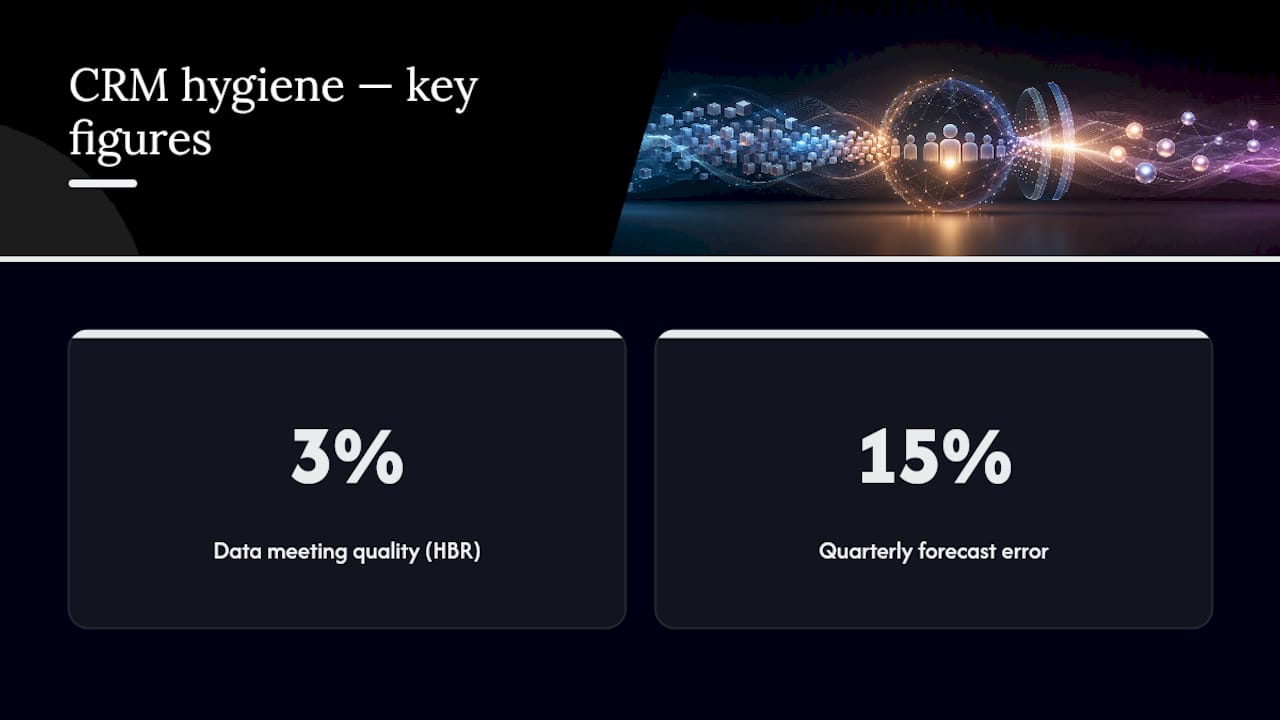
The scale of the underlying problem is larger than most sales leaders assume. Harvard Business Review reported that only about 3 percent of companies’ data meets basic quality standards when measured against simple accuracy and completeness benchmarks. That statistic covers enterprise data broadly, but CRM records, entered manually by reps under time pressure, tend to be among the messiest datasets in any company’s stack.
Deliverability takes a direct hit too. Stale or invalid email addresses feed into outreach sequences and marketing sends, and every hard bounce chips away at sender reputation. A CRM full of unverified contacts is one of the fastest ways to tank a domain’s email standing, which then affects every legitimate email that domain sends afterward, not just the bad ones.
The operational symptoms show up before the revenue symptoms do. Reps stop trusting the CRM once they’ve been burned by a duplicate that split their activity history across two records. They start keeping their own spreadsheets on the side, which creates a second source of truth and makes the hygiene problem worse, not better. Automations built on conditional logic, “if industry equals X, assign to Y”, quietly break the moment a required field goes empty, and nobody notices until a lead sits untouched for two weeks.
None of this shows up as a dramatic failure. It shows up as a forecast that’s off by 15 percent every quarter and nobody can say exactly why.
How Do You Spot the Most Common CRM Hygiene Problems?
Before fixing anything, you need to know which failure mode is actually costing you the most. Four patterns show up in nearly every CRM audit, and they tend to compound each other if left alone.
Duplicate records are the most visible problem and often the most damaging. Signs include split activity histories (a contact’s emails logged under one record, their calls under another), two reps working the same account without knowing it, and inflated pipeline totals that don’t survive a close look. Duplicate outreach is the most embarrassing symptom: a prospect gets the same cold email twice from two different reps at your company within the same week.
Stale contacts and data decay are quieter but just as costly. People change jobs constantly, and a contact record that hasn’t been touched in 18 months is statistically unlikely to still be accurate. Prioritize re-checking your highest-value segments first, active pipeline contacts and recently closed accounts, rather than trying to refresh everything at once.
Missing or inconsistent fields break routing and segmentation before anyone notices. A blank “Lead Source” field means that contact never gets pulled into source-based reporting. A “State” field that mixes full names and abbreviations breaks any list segmented by geography.
Orphaned and zombie records are deals or contacts left in limbo, no owner, no recent activity, no clear status. They inflate pipeline counts, confuse automation triggers, and rarely get cleaned up because nobody’s job explicitly includes finding them.
Pro Tip: Run a simple query for records with no owner and no activity in 90 days. That single filter usually surfaces the bulk of your zombie records without any specialized tooling.
The Six-Step Framework: Audit, Dedupe, Standardize, Validate, Enrich, Govern
Fixing CRM data hygiene in the wrong order wastes effort. Enrich before you dedupe, and you’ll pay to enrich the same account twice. Validate too aggressively at record creation, and reps will find workarounds that create even messier data. The sequence matters as much as the individual steps.
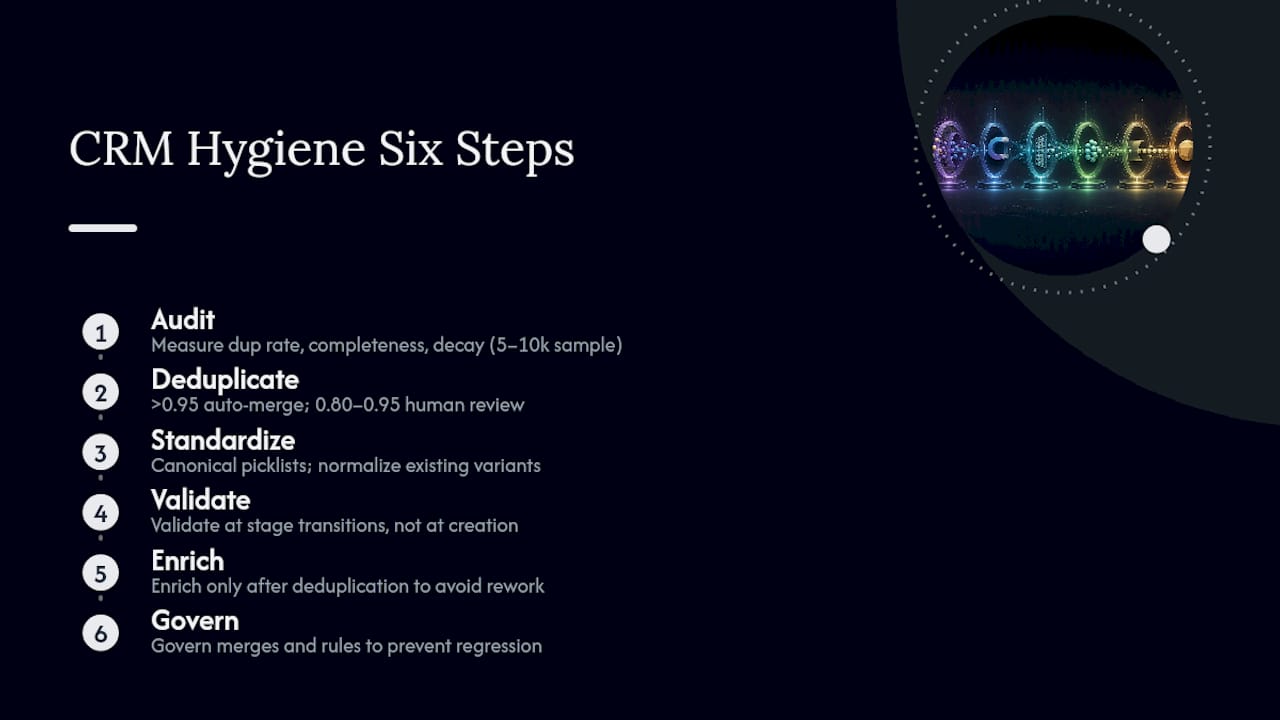
1. Audit: measure before you touch anything. Start by quantifying the actual state of your data rather than guessing. Pull your duplicate rate (percentage of records that are likely duplicates based on fuzzy matching on name, email, and company), your field completeness rate for the handful of fields your workflows actually depend on, and a rough decay estimate (percentage of contacts with no verified activity in the past year). Sample a representative slice, a random 5,000 to 10,000 records, rather than trying to audit everything manually. Report these three numbers to leadership before starting cleanup, so you have a baseline to measure improvement against later. Our guide to auditing CRM data before buying an enrichment tool walks through exactly how to run this audit without paying for extra tooling.
2. Deduplicate before anything else touches the data. Artemis GTM’s audit framework prescribes deduplicating, enriching, validating, and governing, in that exact order, and the logic behind the sequence is sound: every downstream step is more expensive and less accurate if duplicates are still in the system. Set a tiered merge-confidence system rather than a single cutoff. Matches scoring above 0.95 confidence (identical email, near-identical name and company) can auto-merge safely. Matches between 0.80 and 0.95 confidence go into a human review queue, someone checks before the merge executes. Anything below 0.80 gets ignored; forcing a merge on weak evidence does more damage than leaving two similar-but-different records alone. Layer3Labs warns specifically against auto-merging low-confidence matches, because a bad merge corrupts historical activity, call logs, email threads, deal history, that’s expensive and sometimes impossible to fully unwind. When you merge, always preserve the full activity history from both records rather than defaulting to “keep the newer one.”
3. Standardize and normalize before validation rules go live. Build canonical picklists for fields prone to free-text drift: job title tiers, industry categories, lead source values, US state abbreviations. Run a normalization pass across existing records to map variants onto the canonical list (“VP of Sales,” “vp sales,” “Vice President Sales” all become one value). Skipping this step means your validation rules in the next stage will be enforcing consistency on new records while old records stay a mess.
4. Validate at stage transitions, not at record creation. Heavy-handed required fields at the moment a rep creates a lead record kill adoption fast, reps either abandon the CRM or start entering junk data just to get past the form. Validation works better when it’s tied to a meaningful checkpoint, like advancing a deal from “Qualified” to “Proposal,” where the rep already has a reason to fill in the missing information. This single change in timing is one of the more overlooked levers in improving CRM data, and it costs nothing to implement beyond adjusting your workflow rules.
5. Enrich only after the first four steps are done. Enrichment should follow a waterfall approach, checking your cheapest or most reliable source first, falling back to secondary sources only when the primary comes up empty. Prioritize enriching the fields your routing and segmentation logic actually uses; there’s no return on enriching fields nobody queries.
6. Govern so the work doesn’t unravel in six months. Assign a named owner for CRM data quality, typically someone in RevOps, define field-level standards in a living document, and put lightweight change control around who can add new picklist values or modify required-field logic. Gartner’s guidance on improving data quality treats governance as the step that makes every prior investment durable rather than a one-time expense you repeat annually.
Pro Tip: Document your merge-confidence thresholds in writing, not just in the tool’s configuration. When a new RevOps hire inherits the system, they need to know why 0.87 confidence gets queued instead of auto-merged.
What Cadence and Metrics Keep CRM Data Clean Long-Term?
A framework only works if it becomes a rhythm rather than a project. Inveo frames CRM hygiene explicitly as a recurring quarterly discipline built around four repeating workstreams, and breaking that down into weekly, monthly, and quarterly tasks makes it assignable rather than aspirational.
Weekly tasks stay lightweight: reps update activity on their own records, and an automated scan flags new duplicates and bounced emails before they pile up. Monthly work is where RevOps runs the heavier lifting, dedupe passes, enrichment refreshes on active accounts, and archiving zombie deals that have sat untouched. Quarterly reviews step back further: a full field-completion audit, a governance check on whether the documented standards are actually being followed, and a trend report to leadership showing whether the duplicate rate and bounce rate are moving in the right direction. Annually, revisit the schema itself, are the fields you built two years ago still the ones your go-to-market motion actually needs?
| Cadence | Core tasks | Owner |
|---|---|---|
| Weekly | Rep activity updates; automated duplicate and bounce scans | Reps, RevOps |
| Monthly | Dedupe runs; enrichment refresh; archive zombie deals | RevOps, CRM admin |
| Quarterly | Full field audit; governance review; trend reporting | RevOps, sales leadership |
| Annual | Schema and data model review | RevOps, CRM admin |
Four KPIs are worth tracking on a dashboard rather than buried in a spreadsheet: duplicate rate (target under 3 to 5 percent), critical-field completion for active pipeline (target above 90 percent), bounce rate (target under 3 percent), and enrichment coverage on your priority fields. Watching these four numbers move quarter over quarter tells you far more about your CRM’s health than any one-time cleanup report ever will.
When Should You Automate CRM Hygiene, and When Should a Human Review It?
Automation earns its place in CRM data hygiene when the decision is high-confidence and repetitive. It becomes a liability the moment it’s making judgment calls on ambiguous data without a human in the loop.
A few tool categories cover most of the work: dedupers that run fuzzy matching across name, email, and company fields; enrichment tools that pull firmographic and contact data from external sources; email verifiers that catch invalid or risky addresses before a send; and normalization utilities that clean up formatting inconsistencies in bulk. Each solves a narrow problem well, and none of them substitutes for the sequencing decisions a human still needs to make.
The automation rule that matters most: auto-merge only high-confidence matches, and route anything in the medium-confidence range to a human review queue rather than letting the algorithm decide alone. Layer3Labs documents that AI genuinely helps with fuzzy matching and anomaly detection, but the same source is explicit that auto-merging weak matches or enriching before deduplication both cause more damage than they fix. Sequencing discipline matters more than tool sophistication here.
A practical configuration worth adopting: set up a webhook that fires on record creation, checks completeness against your required-field list, and quarantines incomplete records into a review queue rather than letting them flow straight into active workflows. This catch gaps at the point of entry without imposing the same friction that kills adoption when validation rules are too aggressive. For a broader look at where automation hits its limits in sales tooling generally, what a sales engagement platform can’t automate covers similar tradeoffs from a different angle.
Pro Tip: Before enabling any auto-merge rule, run it in “log only” mode for two weeks. Review what it would have merged before letting it actually execute changes.
A Quarter-One Checklist to Start Your Hygiene Program
Turning this framework into something a team can actually execute starts with a small pilot rather than a company-wide mandate.
Week 0: Run a quick audit on your top 10,000 records by activity or deal value, and execute a small dedupe pass to prove the process before scaling it.
- Assign an owner: RevOps typically owns the program end to end.
- The CRM admin configures merge thresholds, validation rules, and enrichment waterfalls.
- Sales managers own weekly spot checks and enforcement of field completion within their teams.
- Reps are responsible for updating their own activity logs weekly, not quarterly.
- Set an SLA: “Medium-confidence duplicate matches are reviewed within 48 hours of being flagged.”
- Weekly: automated duplicate and bounce scans, rep activity updates.
- Monthly: RevOps runs dedupe and enrichment refresh cycles.
- Quarterly: governance review and a trend report presented to sales leadership.
Copy this straight into whatever project management tool your team already uses. The goal isn’t a perfect system by week two, it’s a system that’s still running by month six.
Who Backs This Framework, and What Compliance Should You Know?
This guide draws on operational frameworks from Gartner, Artemis GTM, and Inveo, cross-referenced against practitioner guidance on sequencing and automation risk from Layer3Labs. Sales Pitch covers CRM hygiene as part of a broader focus on the sales technology stack, deliverability, and outreach infrastructure that non-native English speaking sales teams and RevOps professionals rely on daily.
Data privacy compliance isn’t optional context here, it directly shapes how you run hygiene work. Under GDPR, contacts have a right to have inaccurate data corrected and, in many cases, a right to erasure, which means your dedupe and archival processes need a documented path for permanently deleting records, not just marking them inactive. CCPA imposes similar obligations for California residents, including the right to know what data is held and to request deletion. Practically, this means your governance documentation should specify who can action a deletion request and how quickly, and your enrichment vendors should be vetted for how they source and store the data they’re adding to your records.
If your team includes non-native English speakers filling in free-text fields, standardized picklists reduce the inconsistency that comes from translation or phrasing differences. Our breakdown of the best CRM options for non-native English speaking sales reps covers how validation UX affects adoption for exactly this kind of team.
What Actually Breaks Hygiene Programs in Practice
The biggest mistake I see isn’t a lack of tooling, it’s chasing a perfect dataset before shipping any improvement at all. Teams spend months designing the “ideal” schema and never get to the dedupe run that would have delivered 80 percent of the value in week one. Data cleaning shouldn’t be a blocking prerequisite for automation or AI rollout; it should run alongside those efforts, iterating as you go.
My rule of thumb: auto-merge above 0.95 confidence, review everything between 0.80 and 0.95, and ignore the rest. I’ve seen teams reverse the sequence, enriching before deduping, and burn through enrichment budget re-enriching the same account under two different record IDs, all while the duplicate signal that would have caught it disappeared the moment enrichment overwrote the mismatched fields. Sequence first, perfection never.
— Samuel
Where Sales Pitch Fits Into Your CRM Cleanup Work
Sales Pitch is a resource to turn to once your CRM data is clean enough to actually run outreach on it, not another tool competing for a slot in your tech stack. Once duplicate rates drop and routing rules stop misfiring, the next constraint is usually the outreach itself: what you send, how it’s worded, and whether it lands.
That’s the gap Sales Pitch fills. The site publishes practical, real-time content on cold email deliverability, outreach scripts, and sales technology comparisons, built for practitioners running campaigns, not software buyers comparing feature lists. If your team includes non-native English speakers, the B2B English vocabulary guide and the library of cold email templates give reps language that’s already proven to convert, so clean CRM data doesn’t go to waste behind outreach that doesn’t land.
Start by browsing the Sales Pitch homepage for the templates and deliverability guides most relevant to your current campaigns, and bookmark the ones your team will use this month, not someday.
Sources
- Harvard Business Review — Only 3% of companies’ data meets basic quality standards
- Artemis GTM — CRM data quality audit & fix guide
- Layer3Labs — CRM Data Quality: The AI Cleanup Playbook
FAQ
Is CRM Used for Data Cleaning?
A CRM stores and structures your customer data, but it isn’t a dedicated cleaning tool on its own. Most teams pair their CRM with deduplication software, email verifiers, and enrichment tools, then apply the audit, dedupe, standardize, validate, enrich, and govern framework to keep the underlying records clean over time.
What Is Data Hygiene in a CRM?
CRM data hygiene is the ongoing practice of keeping records accurate, complete, consistent, and current rather than letting them decay. It covers deduplication, standardizing formats, validating required fields, and refreshing stale contacts on a recurring cadence, typically weekly, monthly, and quarterly.
What Is CRM in Data Management?
Within data management, a CRM functions as the central repository for customer and prospect records that feeds reporting, routing, and automation across sales and marketing. Its value depends entirely on the quality of the data inside it. Gartner’s data quality guidance treats CRM records as a core dataset requiring the same governance rigor as any other business-critical system.
What Are the Four Pillars of CRM?
Definitions vary across vendors, but a common framing centers on people (the users and stakeholders), process (the defined workflows for how deals and accounts move through the system), technology (the CRM platform and integrated tools), and data (the records those processes depend on). Weak data quality undermines all three of the other pillars, even when the process and technology are well designed.